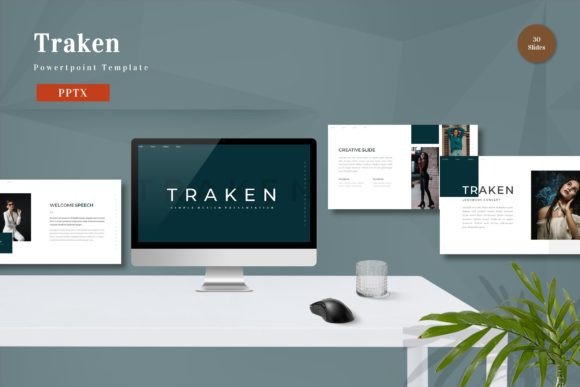
Traken - Powerpoint Template for Professionals
In the fast-paced world of modern communication, the quality of your visual presentation often determines whether your message is received or ignored. For professionals ranging from startup founders to seasoned educators, finding a tool that balances aesthetic appeal with functional flexibility is a constant challenge. The Traken - Powerpoint Template addresses this need by offering a comprehensive suite of design assets tailored for diverse business and personal scenarios. Unlike generic templates that force users into rigid structures, Traken provides a dynamic foundation where every element is designed to be fully editable, allowing you to input your content, swap placeholder images, and adjust color schemes to match your specific brand identity.
Streamlining Your Presentation Workflow
Time is one of the most valuable resources for any professional. Spending hours wrestling with alignment tools, font inconsistencies, or broken layouts detracts from the actual work of crafting a compelling narrative. The Traken - Powerpoint Template is engineered to solve these friction points immediately. By utilizing vector-based master slides, the template ensures that changes made to the design system propagate automatically across all 150 total slides included in the package. This means that if you decide to change your primary accent color or update a logo placement, the adjustment happens globally without the need for manual intervention on individual slides.
This efficiency is particularly beneficial for entrepreneurs and small business owners who may not have a dedicated design team. Instead of hiring a graphic designer for every quarterly report or pitch deck, you can leverage the pre-built structures within Traken. The "Just Drag and Drop" functionality simplifies the process of inserting data, charts, and imagery, allowing you to focus on the substance of your argument rather than the mechanics of slide creation. Whether you are preparing a complex financial forecast or a simple team update, the underlying architecture supports rapid iteration and deployment.
Customization Without Compromise
A common limitation of many presentation templates is the inability to adapt them to unique branding guidelines. With Traken - Powerpoint Template, customization is built into the core experience. The package includes five premade color variations, giving you immediate options to suit different moods or client requirements. However, the true power lies in the ability to modify these colors entirely. You can replace the default palette with your company's exact hex codes, ensuring brand consistency across all your communications.
Furthermore, the template encourages the use of recommended free web fonts, which enhances readability and modernizes the look of your text without licensing concerns. This attention to typography details helps in creating a polished final product that resonates with adult audiences aged 20 to 50, who expect a certain level of professionalism in digital media. For marketers and bloggers, this level of control means that your presentations will seamlessly integrate with your existing website and social media assets, reinforcing your brand voice at every touchpoint.
Strategic Slide Management for Complex Projects
One of the standout features of the Traken - Powerpoint Template is the sheer volume and variety of layout options provided. While the package contains 150 total slides, it specifically highlights 30 useful, distinct slide types that cover the most common presentation needs. These include timelines, process flows, organizational charts, and comparison matrices. This variety ensures that you are not forced to stretch a single layout to fit disparate types of information, which often leads to cluttered and confusing slides.
For educators and trainers, having access to a wide range of structured layouts is invaluable. Imagine preparing a semester-long course curriculum; you can utilize different slide styles for lecture notes, case studies, and assessment reviews, keeping the audience engaged through visual variety. Similarly, freelancers presenting project proposals can select specific slide types that highlight their workflow, pricing models, and portfolio pieces effectively. The inclusion of animated slides adds another layer of engagement, allowing key points to appear sequentially and guiding the viewer's attention exactly where you want it during a live presentation.
Practical Application Across Industries
The versatility of Traken - Powerpoint Template makes it suitable for a broad spectrum of users. Consider a publisher pitching a new book series to an agent. They can use the widescreen format to showcase high-resolution cover art and sample chapters, utilizing the clean, uncluttered designs to let the content shine. In contrast, a hobbyist organizing a community event might use the same template to create a clear agenda and budget breakdown, benefiting from the easy-to-edit nature of the charts and tables.
Small business owners often face the dual challenge of needing to impress investors while also communicating clearly with staff. Traken bridges this gap by offering a professional aesthetic that commands respect in boardrooms, yet remains accessible enough for internal training sessions. The five PPTX files included in the download provide separate versions for each color scheme, meaning you can maintain a consistent library of decks for different departments or clients without starting from scratch each time.
Ensuring Compatibility and Ease of Use
Technology should enable creativity, not hinder it. A significant barrier for many users is the complexity of setting up new templates or troubleshooting compatibility issues. The Traken - Powerpoint Template mitigates these risks by adhering to standard PowerPoint formats and including a detailed readme file. This documentation guides users through the setup process, explaining how to edit elements, replace images, and navigate the master slide view. It is a practical resource that reduces the learning curve, making the template accessible even to those with limited technical expertise.
It is important to note that while the template offers extensive design capabilities, it does not include the preview images shown in marketing materials. Users must supply their own content and visuals to complete the presentation. This approach ensures that the final output is authentic to your specific project rather than relying on stock photography that may not align with your message. It places the responsibility of content quality squarely in your hands, supported by a robust design framework.
When to Choose Traken Over Other Options
While there are countless presentation tools available, Traken - Powerpoint Template stands out for users who require a balance between structure and flexibility. If you frequently present to diverse audiences and need to switch between formal corporate reports and creative brainstorming sessions, the 150-slide library provides the necessary depth. Conversely, if you only need a single slide for a quick announcement, a simpler tool might suffice. However, for anyone looking to build a long-term library of professional assets that can evolve with their business, the investment in a comprehensive solution like Traken yields significant returns in time saved and quality improved.
Ultimately, the goal of any presentation is to communicate ideas effectively. By removing the technical barriers and providing a visually sophisticated canvas, Traken allows you to concentrate on what truly matters: your story, your data, and your vision. Whether you are refining a pitch for venture capital, teaching a critical lesson, or planning a personal milestone, having a reliable, editable, and aesthetically pleasing template ensures that your message is delivered with clarity and impact.