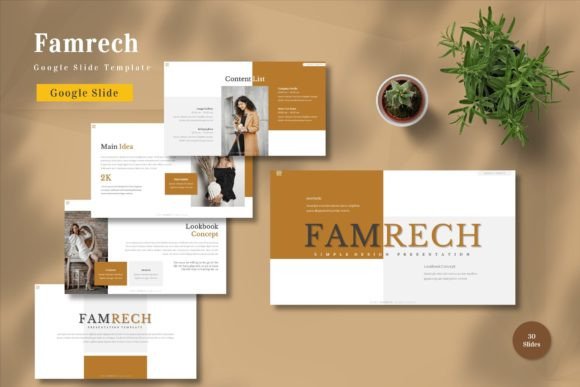
Famrech - Google Slide Template for Professionals
In the fast-paced world of digital communication, the quality of your presentation often speaks louder than the data you present. Whether you are pitching a startup to venture capitalists, delivering a quarterly report to stakeholders, or teaching a complex concept to students, visual clarity is paramount. This is where the Famrech - Google Slide Template becomes an essential tool in your creative arsenal. Designed for versatility and ease of use, this template bridges the gap between professional design standards and the accessibility of cloud-based collaboration tools.
Many professionals struggle with the time-consuming task of building slides from scratch. The result is often a disjointed deck that lacks cohesive branding or visual impact. Famrech solves this problem by offering a comprehensive suite of pre-designed layouts that are fully editable within the Google Slides ecosystem. By choosing this template, you are not just downloading a file; you are investing in a workflow that prioritizes efficiency without sacrificing aesthetic appeal.
Why Choose a Master Slide-Based Design?
The core strength of the Famrech - Google Slide Template lies in its architecture. Unlike basic templates that require manual adjustments for every single slide, this resource is built on vector-based master slides. This technical foundation ensures that every element—from fonts to icons—is scalable and crisp, regardless of the screen size it is viewed on. When you make a change to the master slide, such as updating a logo or shifting a color scheme, that change propagates instantly across the entire deck.
This feature is particularly valuable for businesses that need to maintain strict brand consistency. Imagine needing to update your company's primary color from blue to green across a 50-slide annual report. With a standard template, this could take hours of tedious clicking and formatting. With Famrech, the process is streamlined, allowing you to focus on refining your message rather than wrestling with alignment guides and font sizes.
A Comprehensive Suite of Visual Assets
One of the most compelling aspects of this template is its sheer volume and variety. The package includes a staggering 150 total slides, ensuring that you have a specific layout for almost any scenario you can envision. Within this collection, there are 30 distinct, highly useful slides designed for critical business functions like financial charts, team introductions, project timelines, and SWOT analysis.
Furthermore, the template comes with five premade color schemes. These palettes are carefully curated to be visually pleasing and professional, ranging from bold, high-contrast options for marketing pitches to softer, more neutral tones for corporate reports. If these predefined colors do not match your brand identity exactly, the template allows you to easily customize them. You can input your own content, replace placeholder images with your own photography, and adjust the color palette to align perfectly with your organization's guidelines.
Practical Applications Across Industries
The utility of the Famrech - Google Slide Template extends far beyond the boardroom. Its flexible design makes it suitable for a wide array of users, from entrepreneurs and marketers to educators and hobbyists. Let's explore how different professionals can leverage this tool to enhance their output.
- Entrepreneurs and Startups: For founders seeking investment, the ability to present a polished narrative is crucial. The animated slides included in the template help maintain investor engagement, while the clean layouts ensure that key metrics and growth projections stand out clearly.
- Marketers and Agencies: Marketing teams often juggle multiple client brands. The drag-and-drop functionality and easy color customization allow agencies to rapidly prototype campaign decks that feel bespoke for each client without starting from zero.
- Educators and Trainers: In an educational setting, keeping an audience attentive is challenging. The inclusion of animated transitions and varied slide structures helps break up monotony, making complex topics more digestible for students or workshop participants.
- Freelancers and Consultants: Independent professionals need to look established and reliable. Using a high-quality template like Famrech elevates the perceived value of their services, signaling attention to detail and professionalism before a single word is spoken.
Enhancing Engagement Through Animation
In modern presentations, static text can often lead to audience disengagement. The Famrech - Google Slide Template addresses this by including animated slides designed to guide the viewer's eye naturally through the content. These animations are not gimmicky; they are purposeful, helping to reveal information step-by-step and emphasize key points. Whether you are walking through a case study or unveiling a new product feature, these dynamic elements add a layer of sophistication that keeps your audience focused.
Moreover, the template supports widescreen formats, which is the standard for most modern projectors and monitors. This ensures that your content fills the screen without awkward black bars or distorted graphics, providing an immersive viewing experience.
Streamlining Your Workflow with Google Slides
One of the most significant advantages of this template is its native compatibility with Google Slides. In a collaborative environment, real-time editing is non-negotiable. With Famrech, you can invite team members to edit the deck simultaneously, leave comments, and track changes seamlessly. There is no need to convert files between PowerPoint and other formats, which often leads to broken layouts and lost formatting.
The "Just Drag and Drop" philosophy simplifies the creation process even further. You don't need to be a graphic designer to achieve professional results. Simply select a slide layout, paste your text, and drop in your images. The recommended free web fonts included in the package ensure that typography remains consistent and readable across all devices, eliminating the headache of missing font errors.
What Is Included in Your Download?
When you acquire the Famrech - Google Slide Template, you receive a complete toolkit designed for immediate deployment. The download includes five separate Google Slide files, each corresponding to one of the five premade color themes. This structure allows you to keep versions organized or share specific color variations with different departments.
Additionally, the package comes with a detailed Readme file. This document serves as a quick-start guide, explaining how to navigate the master slides, swap images, and customize colors. It also clarifies that while preview images are used to showcase the template's potential, they are not part of the final files, ensuring you start with a clean slate.
Final Thoughts on Implementation
Selecting the right presentation tool is about balancing aesthetics with functionality. The Famrech - Google Slide Template excels in both areas, offering a robust solution for anyone who needs to communicate ideas effectively. Its combination of 150 editable slides, vector-based scalability, and seamless Google integration makes it a standout choice for the modern professional.
Before implementing any template, it is wise to review the provided Readme information to understand the customization capabilities fully. Once familiar with the interface, you will find that creating stunning, cohesive presentations becomes a matter of minutes rather than hours. Whether you are preparing for a major business launch or a personal portfolio review, this template provides the structural integrity and visual flair needed to make your message resonate. Get it now and transform the way you present your work today.