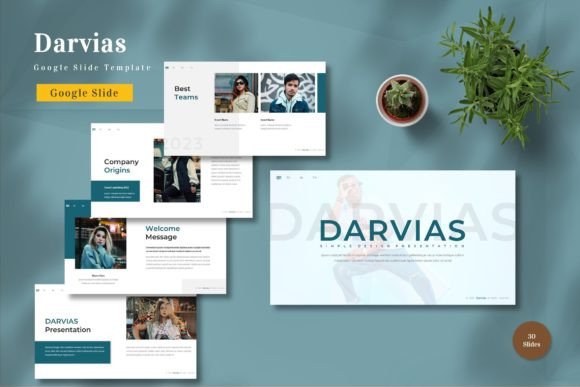
Darviae - Google Slide Template
In the fast-paced world of digital communication, the quality of your presentation often determines the success of your message. Whether you are pitching a startup to investors, teaching a complex subject to students, or sharing a personal portfolio with potential clients, the visual container for your ideas matters as much as the content itself. The Darviae - Google Slide Template offers a robust solution for professionals and creatives who need to communicate clearly without getting bogged down in design minutiae. It is not just a collection of slides; it is a structured environment designed to elevate your narrative.
Many presenters struggle with the blank canvas syndrome. They have brilliant insights but lack the design skills to make them visually compelling. This is where Darviae steps in. By providing a fully editable framework, it allows users to focus on their core message while ensuring the aesthetic remains professional and polished. The template is built on vector-based master slides, which means every element scales perfectly regardless of screen size, maintaining crisp lines and clear typography from a small laptop to a large conference projector.
A Comprehensive Toolkit for Visual Storytelling
The sheer volume of resources included in the Darviae package sets it apart from standard templates. With 150 total slides, you have an extensive library of layouts to choose from. However, quantity alone does not define value; the utility of these slides is what truly counts. Among the 150 options, there are 30 useful slides specifically curated for high-impact scenarios. These include data visualization charts, team introduction layouts, timeline infographics, and comparison matrices that are ready for immediate use.
One of the most significant advantages of this template is its flexibility. Every element is editable. You are not locked into a rigid structure. If you need to rearrange a text box, change the hierarchy of information, or swap out a placeholder image for your own branding, the process is intuitive. The "drag and drop" functionality ensures that even those with minimal design experience can customize the deck effectively. This accessibility democratizes high-quality design, allowing freelancers, educators, and small business owners to produce work that rivals agencies with dedicated design teams.
Color Psychology and Brand Consistency
Color plays a pivotal role in how an audience perceives your message. The Darviae template comes with 5 premade colors, each carefully selected to evoke different moods and professional tones. Whether you need a bold, energetic palette for a marketing pitch or a subdued, trustworthy scheme for a financial report, one of these color schemes will likely align with your needs. Because the template is master slide-based, changing the primary color theme updates the entire presentation instantly. This feature is invaluable for maintaining brand consistency across multiple decks or for A/B testing different visual approaches for the same content.
For businesses with specific brand guidelines, the ability to modify these colors easily is a game-changer. You can input your exact hex codes to match your company logo, ensuring that every slide reinforces your brand identity. This level of customization prevents the "template look," making your presentation feel bespoke rather than generic. The recommended free web fonts further enhance this professional finish, ensuring that your text is legible and stylish across all devices without requiring paid font licenses.
Practical Applications Across Industries
The versatility of the Darviae - Google Slide Template makes it suitable for a wide range of users. Let's explore how different professionals can adapt this tool to meet their unique goals.
- Entrepreneurs and Startups: When seeking funding, clarity and confidence are key. Use the 30 useful slides to create a compelling investor deck. The animated slides included in the package can help guide the flow of your pitch, revealing information step-by-step to keep investors engaged. Replace the placeholders with your actual product mockups and financial projections to create a narrative that drives action.
- Educators and Trainers: Teaching requires keeping attention spans active. The varied layouts allow you to break up long lectures with interactive elements. Use the timeline slides for historical overviews or the comparison charts for analyzing different theories. The widescreen format ensures that diagrams and charts are visible to everyone in the room, whether in-person or via video conferencing.
- Marketers and Content Creators: For social media managers or bloggers presenting case studies, the visual appeal is paramount. The vector-based graphics ensure that images remain sharp when shared online. You can repurpose these slides into static posts or use the animation features to create engaging short-form video content for platforms like LinkedIn or Instagram.
- Freelancers and Consultants: Your proposal deck is often your first impression with a new client. Using a professional template like Darviae signals competence and attention to detail. Customize the color scheme to match the client's industry or your own personal brand, and use the organized layouts to present your methodology and past successes clearly.
Leveraging Animation for Impact
Animation, when used correctly, is a powerful storytelling tool. The Darviae template includes an animated slide feature that adds a dynamic layer to your presentation. Unlike flashy transitions that distract from the content, these animations are designed to direct the audience's focus. They can be used to reveal bullet points sequentially, highlight key data trends, or introduce speakers smoothly.
However, the key to effective animation is restraint. Do not animate every element on the slide. Instead, use motion to emphasize critical information. For example, if you are discussing a three-step process, have each step appear only after you explain the previous one. This pacing helps the audience digest information without feeling overwhelmed. The template makes this easy to implement, allowing you to control the rhythm of your presentation effortlessly.
Workflow Optimization and Best Practices
To get the most out of the Darviae - Google Slide Template, it is essential to approach the customization process strategically. Before diving into the slides, take time to review the included Readme Information. This document provides crucial guidance on how to edit the master slides, replace images, and adjust the layout without breaking the design integrity. Skipping this step can lead to formatting issues later on.
Start by setting up your master slides. Define your color palette and font styles here so that changes propagate throughout the 150 slides automatically. Next, gather all your assets—images, logos, and data sets—before you begin building the deck. Having everything ready allows you to focus on the narrative flow rather than searching for files mid-process.
When replacing images, ensure they are high-resolution and relevant. Low-quality images can undermine the professional look of the vector graphics. Since the template uses placeholders, simply drag your chosen image into the frame, and it will fit seamlessly. Remember that the preview images provided in the download are not included in the final file, so you must supply your own visual content to complete the look.
Maintaining Clarity and Organization
A common pitfall in presentation design is clutter. Even with a beautiful template, overcrowding slides with too much text or data can confuse the audience. The Darviae template encourages a clean, minimalist approach through its spacious layouts. Use this to your advantage. Stick to one main idea per slide. Use the white space effectively to let your content breathe.
Consistency is another pillar of effective design. Ensure that your headings, subheadings, and body text follow a consistent hierarchy throughout the deck. The template's pre-set styles make this easy to maintain. If you deviate from the style guide for a specific slide, do so intentionally and sparingly to draw attention to something truly exceptional.
Finally, always test your presentation on the device you will be using for the actual delivery. While Google Slides is cloud-based and generally reliable, checking the widescreen aspect ratio and animation timing on the target hardware ensures a smooth experience. The 5 Google Slide Files included in the package offer different starting points, so you can choose the one that best fits your project's scope and duplicate it as needed.
The Darviae - Google Slide Template is more than a design asset; it is a catalyst for better communication. By combining extensive layout options, customizable colors, and user-friendly editing tools, it empowers users to create presentations that are both visually stunning and functionally effective. Whether you are launching a new product, teaching a class, or sharing a personal story, this template provides the foundation you need to make your message resonate. Get it now and transform the way you present your ideas to the world.